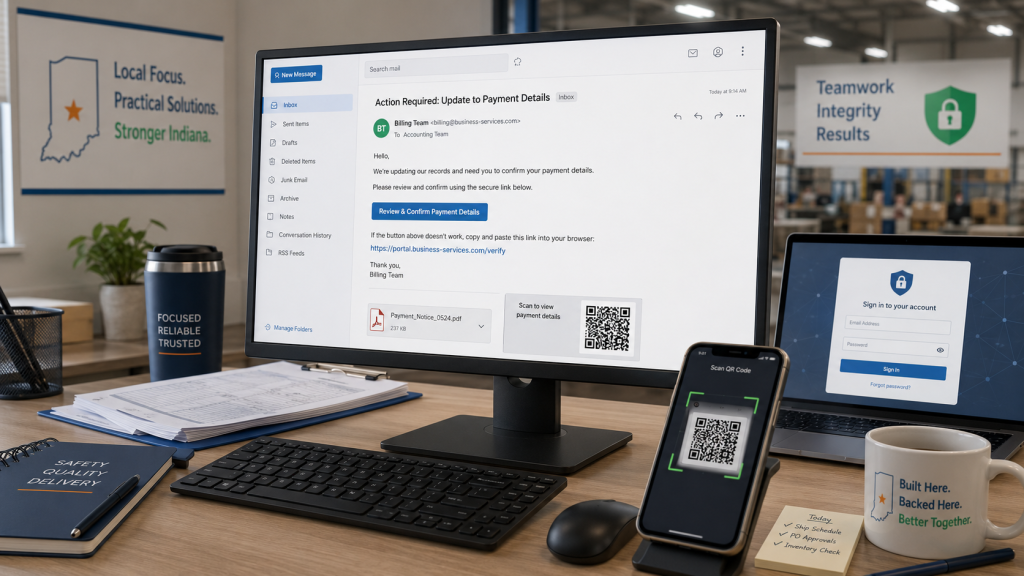
8.3 Billion Phishing Emails identified in Q1 alone. Here's what changed.
Microsoft's threat intelligence team published its Q1 2026 email threat report in late April. The insights are worth a few minutes. What changed is how convincing they've gotten and why the defenses most businesses have in place aren't keeping up.
The shift most businesses have not adjusted for
Most email security conversations we hear still center on attachments. Employees are told not to open any suspicious file attachments and inform their IT department if they see something suspicious. It is important to be careful when opening attachments, but the conversation doesn't end there.
Microsoft's recent report states 78% of email threats arrived as links, not files, in Q1 of 2026. This direct attack pattern arrives as a familiar and seemingly expected email in the user's inbox. The unwitting recipient clicks the link which leads them to a professional login page which looks exactly like a known site for the user (think: Microsoft 365, a banking portal, accounting software, etc). The employee types their credentials, enters their MFA secret. The attacker captures them. No malware involved. Nothing flagged.
Credential phishing was the dominant objective behind malicious payloads every single month of the quarter. The goal is not to break in. It is to log in.
Most business owners still picture a cyberattack as someone forcing their way in. That is the wrong picture. The goal is not to break into your system. They want to trick someone at your company into giving them what is needed to log in.
DTS Field Operations, Indiana Cyber Risk Assessments
QR codes: the fastest-growing blind spot
QR code phishing grew 146% in Q1. January volume was 7.6 million attacks. By March it reached 18.7 million, the highest monthly total recorded in at least a year.
Source: Microsoft Threat Intelligence, Q1 2026 Email Threat Landscape, April 30, 2026. Chart recreated by Diverse Tech Services in DTS brand design. Source data unmodified.
Employees have been trained to distrust suspicious links. Nobody trained them to distrust a QR code embedded in a PDF. Email scanners read text, not images. Seventy percent of QR code attacks in March arrived through PDF attachments. The code looks routine. The destination is not.
What this looks like in practice
This is what rapid containment looks like in practiceFort Wayne, Indiana. February 27, 2026.
A staff member at a local organization received an email with a QR code attached. The sender address looked familiar. He scanned it on his phone. The page that loaded prompted him for his Microsoft 365 credentials and his Windows Hello PIN. Both were entered. Both were captured.
The attack used a device code authentication flow. This detail matters. The attacker did not just steal a password. They captured OAuth session tokens that stay valid even after a credential reset. A simple password change would not have been enough to close access.
What stopped it was monitoring already running before the email arrived. Sign-in logs flagged impossible travel: the same account authenticating from two locations with no time between them. Triage began at 10:47 AM.
Detected within milliseconds. Password reset. All active sessions revoked. Windows Hello PIN reset. MFA reset. Full device scan. After-action report complete by 11:13 AM.
The attack did not fail because it lacked sophistication. It failed because containment happened before any damage could.
Business email compromise: it starts with a friendly message
BEC totaled 10.7 million attacks in Q1. What separates it from other threats is that there is nothing technical to detect. No malware. No suspicious attachment. Just a message.
Eighty-three percent of BEC attacks start with generic outreach. Something like "Are you available?" or "Quick question for you." The attacker builds familiarity, then makes the ask: a wire transfer, a payroll redirect, a gift card purchase. The targets are busy people. The messages look exactly like messages that always get answered.
Source: Microsoft Threat Intelligence, Q1 2026 Email Threat Landscape, April 30, 2026. Chart recreated by Diverse Tech Services in DTS brand design. Source data unmodified.
Three things worth checking this week
- ✓ MFA enforcement, not just MFA enablement. Many businesses have MFA turned on but not required for all accounts, admin accounts especially. Having it available and requiring it are two different configurations.
- ✓ How links are handled after delivery. Standard filters catch known-bad attachments. Catching fresh credential phishing links requires a different capability. Ask your IT provider specifically.
- ✓ A fifteen-minute conversation with your team about QR codes. Unexpected emails prompting them to scan a code and log in anywhere should stop and get verified first. The Fort Wayne event started with a QR code that looked completely routine. It almost did not end the way it did.